
AI is everywhere these days.
We have AI helping us write code, debug applications, create documentation, and even explain why that function we wrote six months ago makes absolutely no sense anymore. 😄
But there’s something I’ve been getting more curious about lately.
AI Agents.
Not just chatting with an AI model, but building something that can understand a request, make decisions, and eventually use tools to perform tasks.
That got me thinking.
As a Software Engineer, I’ve spent years building applications that follow instructions we define in code. But what happens when we start building applications that use AI to help determine their next step?
Well, there’s only one way to learn.
Build something.
¡Hola! 👋 I’m Javi, a Software Engineer and GDG Central Florida Community Organizer. I enjoy exploring new technologies, sharing what I learn, and occasionally getting myself into another project when I probably have enough already. 😄
This time, I’m exploring Google’s Agent Development Kit (ADK).
Why I’m Exploring AI Agents
Over the years, I’ve worked with different technologies, from web development and APIs to cloud services and extended reality.
And one thing I’ve learned is that technology never stops evolving.
Sometimes it feels like just when you’ve gotten comfortable with one framework, three more show up to introduce themselves.
AI is no different.
We’ve seen how large language models can generate text, answer questions, and assist with programming.
But AI agents introduce another interesting idea.
Instead of simply generating an answer, an agent can be designed to work toward a goal, potentially using tools, accessing information, and coordinating different tasks.
That doesn’t mean an agent magically knows what to do or always makes the right decisions.
We still have to design it, give it boundaries, test it, and understand its limitations.
To me, that’s where software engineering comes in.
AI might help decide the next step, but engineering still determines what the system is allowed to do and how we know it works.
And that’s what I want to understand better.
Starting With the Foundations
Rather than jumping straight into complicated multi-agent architectures, I decided to start with Google’s codelab:
Building AI Agents with ADK: The Foundation
The exercise introduces Google’s open-source Agent Development Kit, a framework for developing AI agents.
The goal of this first codelab is straightforward: create a simple personal assistant agent and learn how to run, test, and debug it.
Nothing too fancy yet.
And that’s fine with me.
I’ve always believed that understanding the fundamentals makes it easier to recognize when something is useful and when we’re simply adding complexity.
The codelab covers three main areas:
- Environment setup: Preparing Python and the dependencies needed to work with ADK.
- Agent creation: Defining the model, instructions, and basic configuration for a personal assistant.
- Testing and debugging: Interacting with the agent through the terminal and ADK’s development web interface.
The guide recommends Google Cloud Shell, although working locally is also possible with additional configuration.
For this experiment, I’m keeping my focus on understanding the individual components before attempting anything more ambitious.
A Small Bump Along the Way: When the Codelab Doesn’t Match
We’ve all been there. You’re following a tutorial, everything is going smoothly, and suddenly the instructions don’t match what’s on your screen. 😄
That happened to me in Step 5 of Google’s ADK codelab.
The instructions said to select Gemini Enterprise Agent Platform as option 2:
1. Google AI
2. Gemini Enterprise Agent Platform
3. Log in with Google
But when I ran adk create personal_assistant in Google Cloud Shell, here’s what I actually saw:
1. Google AI
2. Vertex AI
Wait a minute. Where’s Gemini Enterprise Agent Platform?
It turns out Google has been evolving its enterprise AI offerings. In April 2026, Google announced Gemini Enterprise Agent Platform as the evolution of Vertex AI.
In my environment, the CLI still displayed Vertex AI, so I selected option 2 to continue with the Google Cloud backend.
A quick heads-up: These were the options I encountered in October 2026. The ADK CLI and Google’s services continue to evolve, so your experience may be different.
A few things worth checking if you encounter something similar:
- Check your installed ADK version with
adk --version. - Follow the backend names displayed in your environment rather than assuming the option numbers will remain the same.
- Review the current ADK documentation and verify your authentication and environment configuration.
The branding change doesn’t necessarily explain the CLI difference; installed versions and environments can also affect the available options.
My takeaway? Documentation is a starting point. Understanding what we’re configuring helps us troubleshoot when things change.
And sometimes those little bumps teach us more than the exercise itself.
So, What Exactly Is an AI Agent?
Here’s how I’m approaching the concept.
Think about a traditional application.
A user clicks a button. Our code processes the request, follows predefined logic, and returns a result.
An AI agent introduces a language model into that decision-making process.
You give it a goal or request. The model uses its instructions and available context to decide how to respond.
When tools are available, an agent can also choose to invoke them to perform specific operations.
That last part is important.
A language model responding to a question isn’t automatically the same thing as an agent executing tasks.
The model provides reasoning and language capabilities. The agent framework helps organize how those capabilities are used.
I created the infographic below to help visualize how these pieces fit together, from the language model and tools to memory and the orchestration loop.
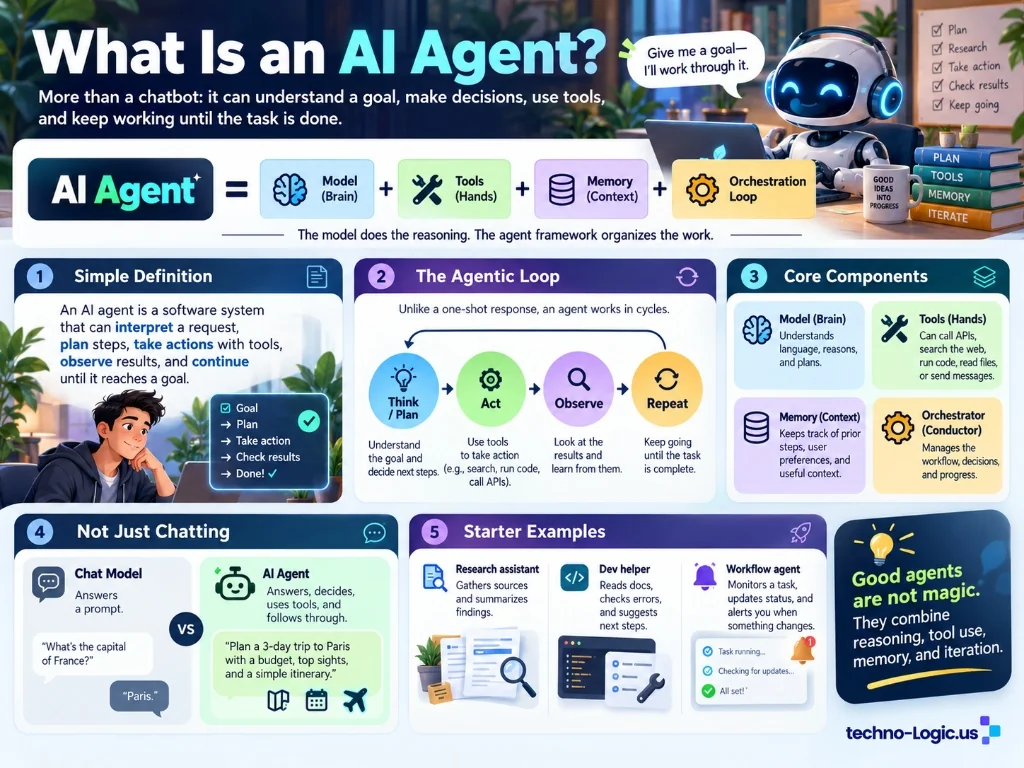
What Is an AI Agent? An illustrated introduction to AI agents, explaining their core components, the think–act–observe–repeat cycle, and how agents differ from traditional AI chatbots. Download it here.
What I find particularly interesting is the agentic loop:
Think → Act → Observe → Repeat
Instead of responding once and stopping, a tool-enabled agent can work through multiple steps, inspect results, and decide what to do next.
Of course, not every agent needs every component illustrated above. Some agents are simple conversational assistants, while others use external tools, memory, and more sophisticated orchestration.
And just like any software system, the architecture matters.
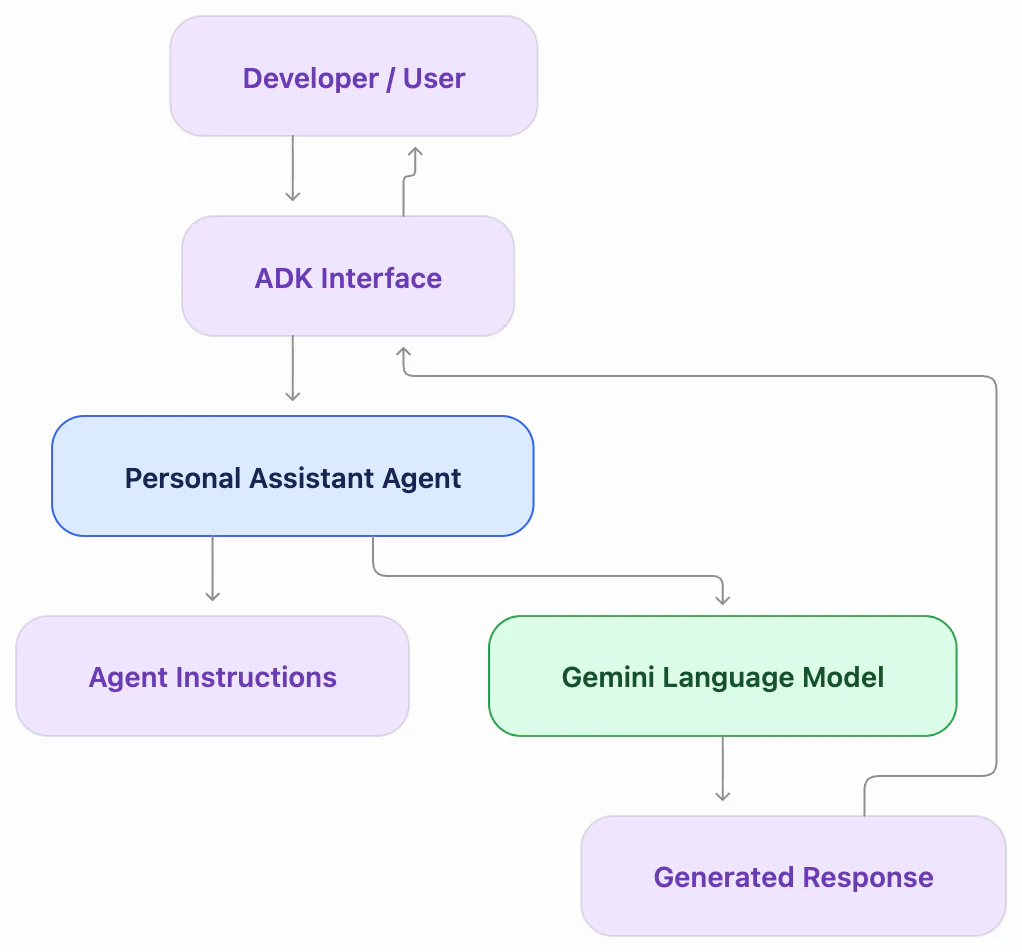
For this first codelab, the agent is intentionally simple. It receives a message, processes it using a Gemini model, and generates a response.
External tools, more advanced workflows, and multi-agent collaboration come later.
Start small. Understand the pieces. Then expand.
What’s Inside a Basic ADK Agent?
One thing I appreciate about the codelab is that it starts with a relatively small project structure.
The foundational example uses three important files:
agent.py: Defines the agent, including its model, name, description, and instructions.__init__.py: Allows Python and ADK to discover the agent module..env: Stores environment-specific configuration such as the Google Cloud project and location.
The actual agent definition is surprisingly compact.
Here’s a simplified version of the example:
from google.adk.agents import Agent

root_agent = Agent(
    name="root_agent",
    model="gemini-3.5-flash",
    description="A helpful personal assistant.",
    instruction="Answer user questions clearly and helpfully.",
)
That’s not a complete autonomous system.
It doesn’t yet have custom tools, external APIs, or a sophisticated workflow.
But it demonstrates something useful.
We can define an agent’s basic behavior through a relatively simple configuration.
The model handles language generation, while the instructions establish how we want the agent to behave.
Of course, instructions aren’t a guarantee of perfect behavior. The outputs still need testing and evaluation.
For a developer, this is a good starting point.
Before introducing more tools or complexity, we should understand the agent we’re building.
Testing Is Where Things Get Interesting
Something I’m particularly interested in is how we test and debug these systems.
In traditional software, we generally expect predictable behavior.
Given a particular input and a defined set of conditions, we can often verify an exact output.
With AI-powered applications, things can become less predictable.
A model might provide two different responses to a similar question. Both might be reasonable, but one could be more accurate or useful than the other.
So how do we evaluate that?
The ADK codelab introduces two ways to interact with the agent:
- Terminal: Run the agent directly using
adk runand have a conversation from the command line.
My First Conversation with an Agent
Once the agent is configured, we can interact with it directly from the terminal using:
adk run personal_assistantThis is what a conversation might look like:
Running agent personal_assistant, type exit to exit.
[user]: Hola! What can you do?
[personal_assistant]: Hello! I am a large language
model, trained by Google. I can do many things
to help you, such as:
...
Nothing too exciting yet, right? 😄
But there’s something interesting happening behind the scenes.
ADK is handling the interaction with the language model, applying the agent’s instructions, and returning a response.
It’s a simple conversational assistant at this stage. We haven’t given it custom tools or connected it to external services.
That’s where the next experiments will get interesting.
- Development Web UI: Use
adk webto interact through a browser and inspect agent events, state, and messages.
That second option is especially interesting to me.
That’s one reason ADK’s Development Web UI caught my attention. It gives developers a way to inspect conversations, events, and agent state.
I’ve spent part of my career working in quality assurance and software development, so being able to inspect what an application is doing matters.
It’s not enough to say:
“Hey, the agent answered my question. It works!”
Well… maybe. 🤔
After all, just because an agent gives us a convincing answer doesn’t mean it’s the correct one. 😄
What happens when the user provides unclear instructions? What if the model returns incorrect information? How do we identify unexpected behavior?
Those are the types of questions I want to explore as I explore the Web UI.
Okay, I Built an Agent. Now What Can I Actually Do With It?
This is where things start getting interesting.
Creating an agent that answers questions is a good first step.
But imagine giving that agent access to specific tools, APIs, or information sources.
Now we’re moving beyond a simple conversation.
We’re exploring what happens when AI becomes part of an actual workflow.
Here are a few ideas that come to mind.
1. A Personal Learning Assistant
Imagine an agent that helps you study a new programming language or prepare for a technical certification.
You could ask it to:
- Generate practice questions based on your study material.
- Explain concepts using beginner-friendly examples.
- Help identify topics that need more attention.
- Recommend the next lesson based on your progress.
With the right tools and data sources, it could become a personalized learning companion.
I can see something like this being useful for developers preparing for certifications or learning a new framework.
2. A Developer Documentation Assistant
We’ve all inherited a project with documentation that could use a little love.
Or sometimes… a lot of love. 😄
Imagine an agent that can search approved project documentation and help answer questions such as:
- Where is authentication handled?
- How do I run the application locally?
- Which API endpoint manages user profiles?
- What changed between two versions?
With document retrieval and appropriate access controls, an agent could help developers navigate unfamiliar codebases more efficiently.
Of course, it still needs to point us to reliable sources. An explanation that sounds convincing but is wrong doesn’t help anybody.
3. An Event Planning Assistant
Here’s one that’s close to home for me.
As a Google Developer Group organizer, there are quite a few moving parts when planning a meetup or conference.
Speakers, schedules, sessions, volunteers, and announcements.
Imagine an agent that could help:
- Draft speaker announcements.
- Organize submitted session descriptions.
- Answer questions from event information.
- Identify scheduling conflicts.
- Prepare a checklist for the event team.
Connect it to a calendar or event-management API, and things could become even more interesting.
I wouldn’t let it publish announcements or change schedules without approval, but it could certainly help reduce some repetitive work.
4. A Technical Presentation Coach
This one connects with something else I’ve been working on: improving my communication and public-speaking skills.
Imagine an agent that helps developers prepare for a presentation.
It could review a script, ask audience-style questions, suggest simpler explanations, or help organize a technical demo.
With speech-processing tools, we could potentially explore feedback on speaking pace, filler words, and pronunciation.
That would be a fascinating personal project.
And probably a useful one for anyone who’s ever gotten nervous before giving a tech talk.
5. A Team of Specialized Agents
Now imagine taking things one step further.
Instead of one agent trying to handle everything, you build a system where different agents have different responsibilities.
For example:
- A research agent gathers relevant information.
- A planning agent organizes the findings.
- A writing agent prepares a draft.
- A review agent checks the result against defined requirements.
One agent coordinates the work, while the others focus on their specific tasks.
This is an example of a multi-agent system.
It sounds exciting, but I’d want to compare it with simpler alternatives before deciding that multiple agents are necessary.
More agents also mean more coordination, latency, cost, and opportunities for failure.
The goal isn’t to build the most complicated agent. It’s to build something genuinely useful.
Now, imagine extending our simple agent with external APIs, documents, and other services. Here’s one way those pieces could fit together:
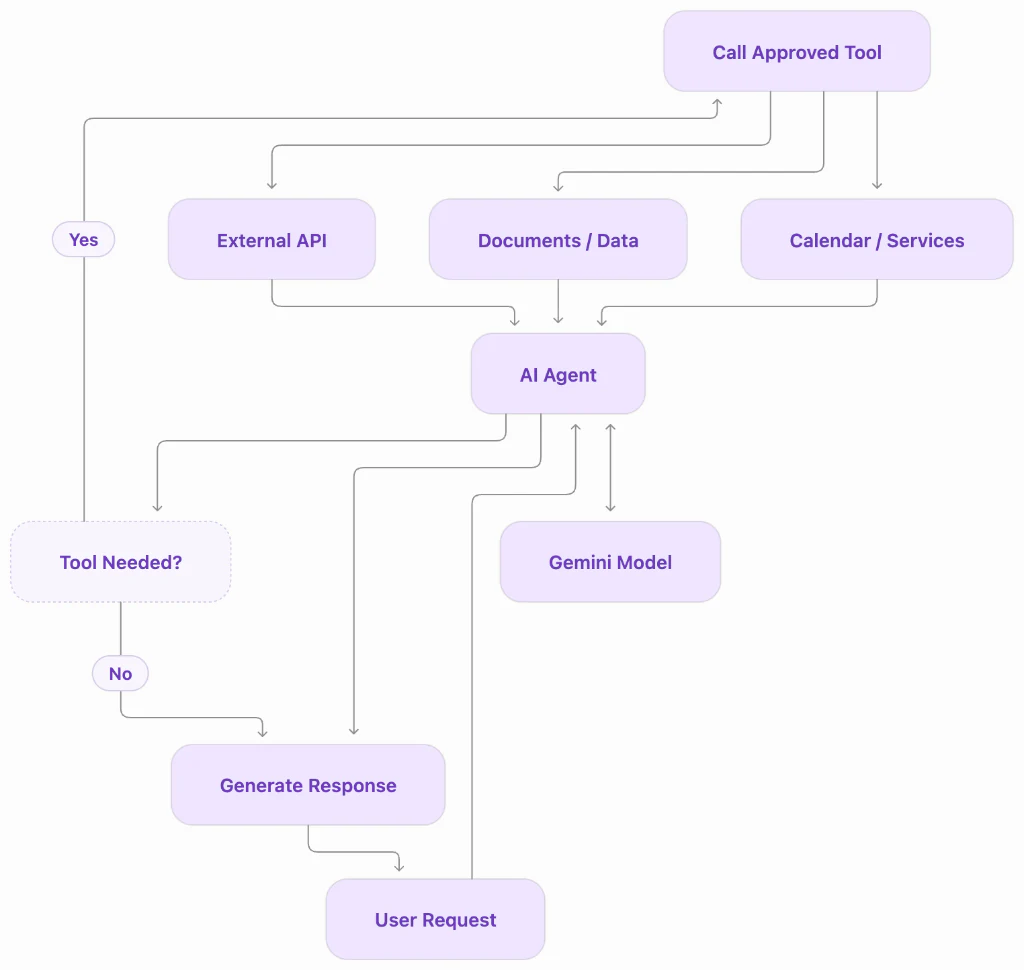
And to be clear, these are ideas for future experiments, not capabilities included in the basic foundation codelab.
The first exercise gives us the starting point.
The rest requires additional tools, integrations, permissions, testing, and a little creativity.
What I Want to Learn From This Experiment
My goal isn’t simply to complete another codelab.
I want to understand enough about the framework to make informed engineering decisions.
A few questions are guiding my learning:
- How does ADK manage the interaction between the user, agent, and language model?
- How can I inspect and debug the agent’s behavior?
- What changes when we introduce tools and external services?
- How do we test a system when responses aren’t always deterministic?
- When does an AI agent make sense compared with a traditional application?
That last question might be the most important one.
Not every problem needs an AI agent.
Sometimes a well-designed API, a background job, or a simple function is exactly what we need.
And there’s nothing wrong with that.
Good engineering isn’t about using the newest technology. It’s about understanding the problem well enough to choose the right solution.
From My Home Lab to a GDG Meetup?
One of the reasons I enjoy being involved with Google Developer Groups is the opportunity to learn something and then share that knowledge with others.
I’ve been involved with developer communities for years, and some of my favorite moments have come from watching someone discover that a technology they thought was complicated is actually something they can start experimenting with.
That’s what I’d eventually like to do with this topic.
First, complete the codelab at home.
Then experiment beyond the instructions.
Maybe introduce a simple tool, explore how the agent makes decisions, or build a small practical example.
And once I feel comfortable explaining what I’ve learned, turn it into a presentation or hands-on session for one of our GDG events.
I can already imagine a room full of developers building their first agents, asking questions, breaking something, fixing it, and learning together.
That’s the fun part.
Because teaching something forces us to understand it a little better ourselves.
The Next Step Is to Build
AI agents are an interesting evolution in how we develop software.
But I don’t want to get caught up in the excitement without understanding what’s happening underneath.
The fundamentals still matter.
Architecture matters. Testing matters. Security matters. Understanding the problem matters.
And yes, communication matters too.
After all, if I can’t explain how my agent works to another developer, I probably have more learning to do.
So that’s my plan.
Start with Google’s ADK Foundation codelab. Build a personal assistant. Inspect how it works. Experiment with it.
Then see where the journey takes me.
I’m not trying to become an expert overnight.
I’m trying to become a better engineer, one experiment at a time.
And maybe turn that experiment into something useful for somebody else.
Have you experimented with AI agents yet? What would you build if you could connect an AI agent to the tools you already use?
I’d love to hear what you’re learning.
¡Hasta la próxima! 👋
Javi
Software Engineer | GDG Community Organizer
techno-logic.us